BLOGGER TEMPLATES AND TWITTER BACKGROUNDS �
Tampilkan postingan dengan label Antivirus. Tampilkan semua postingan

Selasa, 07 Januari 2014

Avira Antivirus Suite 2014 14.0.2.344 Incl Key Valid Till 14-09-2015

Avira Antivirus Suite 2014 memberikan perlindungan offline maupun online untuk seluruh keluarga. Bekerja, bermain, berkomunikasi dengan perlindungan penuh. Ini adalah produk terbaik avira yang menggunakan teknologi serta tool-tool canggih yang terdapat pada produk Avira lainnya, bisa di bilang Avira Antivirus Suite 2014 adalah kombinasi dari merek baru produk Avira firewall dan Avira anti-virus dengan segala pelayanan premium. Selain perlindungan antivirus anda juga akan mendapatkan perlindungan email, AntiPhishing, Anti-Spyware dan Anti-Adware, plus Anti-Spam, Firewall, WebGuard (Safe Surfing) dan teknologi game mode.

Screenshot

Download Avira Internet Security 2014 if you:
  • Stream or download movies and TV
  • Play computer games, especially with online partners
  • Connect to wi-fi networks
  • Access your bank accounts or investments on the web
  • Shop in online stores or place bids at auction sites
  • Make online phone calls, instant message or social networks
  • Share your computer with your partner or family members
  • Store your irreplaceable photos, music and videos on your PC
  • Want to be sure your children are safe online

Features
PC PROTECTION
  • Real-Time Protection: Monitors nonstop for viruses, worms, Trojans and more
  • AntiAd/Spyware: Shuts out online spies and annoying adware
  • Protection Cloud: Ultrafast scanning and immediate online identification of new malware
  • Network Drives: Malware scanning for shared folders
  • Rootkit Protection: Traps hidden malware that conventional antivirus doesn’t find
  • ProActive: Halts undiscovered threats by tracking their behavior
  • AHeAD Technology: Inspects unfamiliar code for suspicious signs
  • AntiBot: Blocks hackers’ attempts to take over your computer
  • Backup System: Safeguards your data in case of an accident, hardware failure or theft
INTERNET PROTECTION
  • Browser Tracking Blocker: Stops web trackers from recording your activities
  • Website Safety Advisor: Rates the safety of all sites in your search results
  • Advanced Web Protection: Intercepts malicious websites before they load
  • Advanced AntiPhishing: Proactively protects you against email scams
  • Mail Protection: Keeps infected emails at a safe distance from your inbox
  • FireWall: Forms a protective seal against intrusions (essential for wi-fi)
  • AntiSpam: Weeds out annoying, offensive junk email
  • AntiDrive-by: Blocks unwanted software downloads while you surf
  • * This feature is part of the Avira SearchFree Toolbar (included).
CHILD PROTECTION
  • Social Networks: Extends parental supervision to Facebook and other social media
  • Safe Browsing: Advanced parental controls for blocking inappropriate websites and limiting the time your child spends online
MOBILE PROTECTION
  • Security for Android: Missing phone recovery, privacy protection, unwanted call/SMS blocking and more
REPAIR
  • Quick Removal eliminates viruses in one click.
  • Generic Repair removes all traces of infection automatically.
  • Rescue System jumpstarts your PC in an emergency.
EXTRA BENEFITS
  • Live Support: Unlimited access to friendly, knowledgeable Avira security specialists
  • Game Mode: Suspends unnecessary notifications during games and movies
  • Netbook Support: Fast performance even on compact machines
  • Express Installation: Skips the boring Q&A to launch your protection fast

Download

Instalasi
1. Unrar
2. Install Avira, pada License Wizard klik "HBDV KEY" kemudian masukan file Key-nya
3. Lanjutkan proses instalasi sampai selesai
4. Enjoy

Advanced SystemCare PRO 7.1.0.389 Final Full Crack

Advanced SystemCare PRO 7.1 adalah sebuah software utilitas yang berguna untuk membersihkan, mendefrag, mengoptimalkan kinerja system windows, serta memperbaiki kerusakan-kerusakan yang terjadi di dalam system windows pc kita. Advanced SystemCare PRO 7.1.0.389 juga memiliki segudang fitur yang jarang di miliki software-software utilitas sejenis, serta memiliki tampilan antar muka yang sangat keren. Advanced SystemCare PRO 7.1.0.389 juga di lengkapi dengan Anti Malware serta dapat meningkatkan kecepatan internet dengan cara mengoptimalkan settingan pada system windows PC kita.

Screenshot

Features
Enjoy That New PC Feeling Again:
Whatever version of Windows you're running, enjoy that "good as new" speed usually only experienced on a brand new PC.
Automated Working in the Background:
Just install it and forget it. This powerful utility works continuously, automatically and quietly in the background on your PC. You can set it as your schedule or just let it work automatically when your PC is idle.
Keeps Your PC Running at Peak Performance:
Fully optimizes Windows for ultimate system performance and top Internet speed by unleashing the built-in power of your system, based on how you use your PC and your network configuration. Turns your PC into a business PC, a productive workstation, an entertainment center, a game machine, or a scientific computing PC.
Quick and Extensive System Clean-up:
Boosts your system's performance by cleaning missing files, destroying unwanted files, deleting obsolete files, and removing junk files. Supports clean-up of over 50 different types of junk files.
Next-generation Registry Deep Clean and Optimization:
Safely cleans registry junk, compacts registry bloats and defragments the whole registry for maximum performance. Finds and fixes the registry errors that other utilities miss with "Deep Scan" technology.
Ultimate Speeding Up with Turbo Boost:
Turbo Boost can speed up your PC by shutting down unnecessary background processes, cleaning RAM, and intensifying processor performance.
Powerful Hard Drive Defragmentation:
Fast, powerfully and incredibly effective Disk Defrag function to defragment hard drives - up to 10 times faster than other defragmentation tools.
Defends PC Security with Extra Protection:
Detects and analyzes Windows security environment. Scans and removes spyware and adware using up-to-date definition files. Prevents spyware, hackers and hijackers from installing malicious programs on your computer. Erases and updates your PC's activity histories.
Fixes Multiple System Errors:
Keeps your PC stable and running at peak efficiency. Continuously repairs system configurations by eliminating system bottlenecks and preventing crashes.

Download

Instalasi
1. Unrar
2. Install SystemCare Pro
3. Copy crack ke direktori instalasi programnya
4. Enjoy

Sabtu, 04 Januari 2014

GridinSoft Trojan Killer 2.2.0.6 Full Patch

GridinSoft Trojan Killer merupakan software yang sangat ampuh untuk memeriksa dan menghapus program-program jahat seperti adware, spyware, malware dan trojan yang sering kali terlewatkan dan tidak terbaca oleh Antivirus. Software ini sangat recommended di gunakan sebagai pendukung AntiVirus dalam mengamankan PC dari program-program jahat yang semakin hari semakin canggih.

Screenshot

Download

Instalasi
1. Unrar
2. Install Trojan Killer
3. Copy patch ke direktori instalasi programnya
4. Run Patch kemudian apply patch
5. Jalankan program trojan killer lalu register dengan sembarang serial & name
6. Enjoy

Senin, 16 Desember 2013

Kaspersky Internet Security 2014 14.0.0.4651 + Trail Reset

Kaspersky Internet Security 2014 atau yang biasa di kenal dengan sebutan "KIS" adalah antivirus mutakhir terkini yang mampu melindungi PC dari berbagai macam virus, malware, spyware, adware dan berbagai program jahat lainnya yang dapat mengancam keamanan PC anda. Berdasarkan pengalaman, Kaspersky Internet Security 2014 sangat tangguh dalam menjaga PC dari kerentanan terhadap virus, Antivirus ini juga mampu melindungi pengguna secara real time saat online internet maupun offline internet.


Features
  • Real-time Internet protection against all viruses and online threats
  • Secures online banking and shopping with unique Safe Money technology
  • Uses real-time, proactive and cloud technologies to detect new, emerging and unknown threats
  • Safeguards your digital identity and privacy
  • Identifies suspicious and phishing websites
  • Hassle-free protection with maximum PC performance
  • Ensures the applications on your PC are safe with Trusted Application Mode
  • Helps you keep your children safe and responsible online
  • And many more....

What's new in this version ?
  • To increase security of applications, Trusted Applications mode has been added. When Trusted Applications mode is enabled, Kaspersky Internet Security allows starting only known and trusted applications and ensures that they are run safely. Trusted Applications mode will be available in September 2013, after an update to Kaspersky Internet Security.
  • Protection against screen lockers has been added. You can unlock the screen by using a specified key shortcut. Protection against screen lockers detects and eliminates the threat. Screen lockers can now be automatically monitored and rolled back.
  • On Windows 8, Kaspersky Internet Security can minimize activity when switched to Connected Standby mode. When running in limited activity mode, Kaspersky Internet Security pauses scan tasks and update tasks. When the computer returns from Connected Standby mode, all paused tasks are resumed automatically.
  • The latest versions of popular web browsers are now supported: protection components (such as Kaspersky URL Advisor or Safe Money) support Mozilla Firefox 16.x, 17.x, 18.x, 19.x, 20.x, 21.x. and 22.x; Internet Explorer 8, 9, and 10; and Google Chrome 22.x, 23.x, 24.x, 25.x, 26.x, and 27.x.
  • The option of participating in the Protect a Friend program has been added. You can now share a link to Kaspersky Internet Security with friends and receive bonus activation codes.

System Requirements
  • Intel Pentium 300 MHz or higher (or equivalent)
  • 256 MB available RAM
  • 50 MB free space on the hard drive
  • CD-ROM (for installation of the program from CD)
  • computer mouse
  • Internet connection (for product activation)

Download

Instalasi
1. Unrar
2. Install KIS 2014
3. Jalankan trial reset
4. Have fun

NOTE: Program ini tidak support untuk di jalankan pada Operating System Windows 8.1, hanya support untuk Operating System Windows 8 ke bawah !!

Senin, 09 Desember 2013

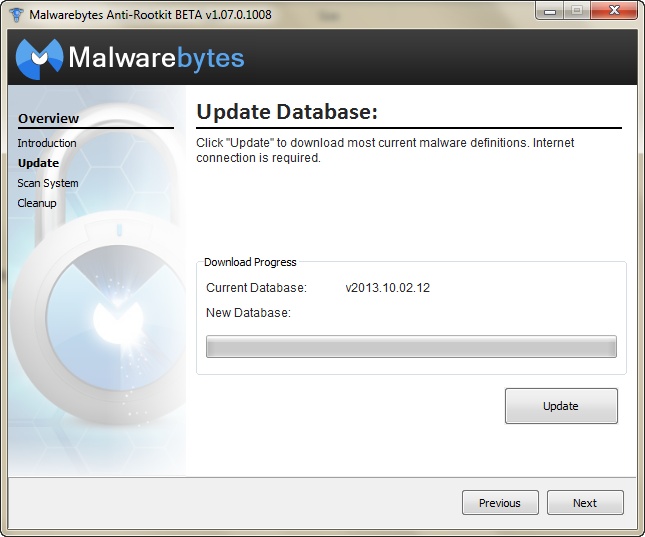
Malwarebytes Anti-Rootkit 1.07.0.1008 Full Free

Malwarebytes Anti-Rootkit adalah sebuah aplikasi yang dapat diandalkan untuk melindungi file dan komputer terhadap serangan rootkit dan memperbaiki kerusakan yang disebabkan oleh adanya virus-virus berbahaya . Rootkit dirancang untuk menyembunyikan keberadaan proses dan program tertentu, sehingga kinerja komputer anda perlahan lahan mulai melambat dan terasa berat, si pengganggu ini juga akan terus menerus meminta dan mengirimkan data saat koneksi internet terhubung sehingga aktifitas browsing terganggu. Namun dengan menggunakan Malwarebytes Anti-Rootkit anda memiliki kemungkinan untuk mendeteksi dan menghapus segala bentuk malware termasuk virus, trojan, adware dan rootkit . Setelah proses scanning selesai, anda dapat menghapus jenis infeksi sistem dengan menekan tombol 'Pembersihan'.

Screenshot

Download

Instalasi
1. Unrar
2. Run Installer
3. Pada Window "Please, enter extraction path" open folder program files (letaknya di C:\Program Files) kemudian klik OK
4. Enjoy

Jumat, 06 Desember 2013

Avast! Internet Security 2014 9.0.2008 Full License Key

Avast! Internet Security 2014 atau yang di kenal juga dengan nama Avast! Internet Security 9 merupakan produk antivirus teranyar yang di rilis oleh perusahaan Alwil Software. Selain di lengkapi dengan Antivirus, Avast! Internet Security 2014 juga di lengkapi dengan Anti Malware, Spyware dan Rootkit, Produk ini juga di sertai dengan fitur SafeZone yang memungkinkan pengguna dapat bertransaksi online secara aman, fitur Silent Firewall yang melindungi pengguna dari serangan hacker dan fitur Anti Spam yang akan melindungi pengguna dari phishing dan scam email.

 Screenshot

Minimum System Requirements
  • Windows XP SP2/Vista/7/8/8.1 (32 and 64 bit)
  • Pentium 3 Processor
  • 600 MB disk space
  • 128 MB RAM

Download

Instalasi
Cara Install No1
1. Run Installer
2. Pilih 'I've already bought a product' lalu klik open lisensi yang anda download
3. Selesaikan proses instalasi
4. Enjoy

Cara Install No2
** Cara ini di gunakan jika sebelumnya anda sudah menginstall avast! Internet Security di PC anda:
1. Double click icon Avast! di system tray icon pc anda
2. Klik "Setting" kemudian pilih "Troubleshooting" lalu uncheck "Enable avast! self-defense module" lalu klik "Ok"
3. Kemudian Klik "Setting" pilih "Subscription" kemudian "klik Insert license Key" lalu open folder "key avast9" selanjutnya pilih salah satu license key yang ingin anda gunakan (kalau admin menggunakan license "avast! Internet Security 2014 valid 16.09.2016.avastlic")
4. Setelah key-nya di insert aktifkan lagi avast! self-defense module (ulangi langkah no2 tapi kali ini di checklist)
5. Enjoy

NOTE
Jika anda mengalami masalah saat browsing internet (tampilan blog / web jadi berantakan, ada beberapa bagian dari web / blog yang tidak tampil dan masalah-masalah yang belum pernah anda temui lainnya). Untuk mengatasinya cukup dengan menonaktifkan Add-ons avast! Online Security.

Untuk pengguna mozilla:
- Klik Tools
- Pilih Add-ons
- Lalu klik Disable pada add-on avast! Online Security
- Restart browser anda
- Enjoy

Jumat, 22 November 2013

AVG Internet Security 2014 14.0 Build 4259a6848 (x86/x64) Full Serial Key

AVG Internet Security 2014 v14.0 merupakan produk terbaik dari Antivirus AVG yang memberikan perlindungan ekstra kepada pengguna dari ancaman-ancaman yang tidak di inginkan baik offline maupun saat online. Produk antivirus professional ini di rancang dengan antar muka yang sangat user friendly dan menyediakan akses cepat ke modul yang paling penting pada layar utama. Di dalam AVG Internet Security sudah termasuk dengan Anti-Virus, LinkScanner, Perlindungan E -mail, Firewall, Anti-Rootkit, System Tools, PC Analyzer dan Identity Protection yang kesemuannya berfungsi untuk mengamankan, mendeteksi dan melindungi PC anda dari ancaman-ancaman yang dapat mengganggu keamanan pc anda.

Screenshot

Features
  • AntiVirus. Helps stop, remove, and prevent the spreading of viruses, worms or trojans.
  • AntiMalware (AVG Resident Shield). Protects you from malware on your PC and helps stop anything that’s infected.
  • AVG Anti-Rootkit. Detects and removes dangerous rootkits that hide malicious software that seeks to take control of your computer.
  • AVG Email Scanner. Detects infected or rogue inbound attachments so they can’t damage your PC. Works as a plug-in for email applications including Microsoft Outlook 2010 or as a scanner for POP3, SMTP and IMAP accounts.
  • AVG Protective Cloud Technology. Identifies and prevents emerging threats “in the cloud” via automatic updates to your antivirus software.
  • AVG Community Protection Network. Instantly converts every new threat encountered by any member of our community into protection for everyone. It adds up to ever-better antivirus protection for the entire AVG community.
  • AVG LinkScanner Surf-Shield. Smart prevention technology that stops you hitting infected or criminal sites. Actively checks every web page just before you click and stops you if it detects anything suspicious.
  • AVG Social Networking Protection. Checks the links that get exchanged when you’re on social networks such as Facebook, Twitter etc. to help keep you and your friends safe.
  • AVG Online Shield. Checks files before you download them to ensure they are safe, and protects you as you exchange files using MSN and Yahoo! and ICQ.
  • AVG Anti-Spam. Stops spammers and scammers getting to you. Reduces your risks of falling prey to online spam by scanning and checking all your emails for suspect content and code.
  • AVG Do Not Track. Lets you identify which websites are collecting data on your online activities and gives you the choice whether to allow it. This is available if you take AVG Security Toolbar as part of your installation or as a separate plugin. Supports Internet Explorer, Mozilla Firefox and Google Chrome.
  • AVG Identity Protection. Not only keeps your personal information safe when you’re busy online, but also stops criminals stealing personal data on your PC.
  • Anti-Spyware. Keep your identity safe from the Spyware and Adware that tracks personal information.
  • AVG WiFi Guard. Helps you avoid the rogue WiFi access points used by hackers by alerting you when your PC tries to access an unknown WiFi network.
  • AVG Enhanced Firewall. Blocks hackers attempting to access the private data stored on your PC. Stops malware taking over your computer or from harming other peoples. Works on wired and wireless networks.
  • AVG Turbo Scan. Dramatically shortens security-scanning times thanks to a smarter scanning sequence that follows the order in which files are saved to the hard drive.
  • Game Mode. Keeps scans and updates at bay whilst you play to avoid lags and freezes. Also safeguards your digital profile from hackers looking to steal and sell your game rewards.
  • AVG Smart Scanner. Only scans your PC when you’re not using it. Drops to low priority mode as soon as you move your mouse or hit a key. To keep scan times to a minimum it ignores files it’s already scanned and knows are safe.
  • AVG Accelerator. Maximizes connection speeds and the download of binary data to deliver faster, smoother video streaming. Dramatically enhances the experience of YouTube videos.
Operating System: Windows XP, Vista, Windows 7, Windows 8 (32-bit and 64-bit Editions).

Download

Instalasi
1. Unrar
2. Install AVG Internet Security 2014
3. (Masih dalam proses instalasi) saat sampai pada bagian "Activate Your License" masukan serial key-nya
4. Enjoy

Kamis, 21 November 2013

Avira Internet Security Suite 2014 v14.0.1.179 + HBEDV.KEY

Avira Internet Security Suite 2014 dilengkapi dengan interface user-friendly yang dapat dengan mudah dioperasikan bahkan oleh pemula karena semua fungsi yang intuitif disajikan. Antivirus ini lebih maju dari Avira Free Antivirus dan Avira Antivirus Premium, karena mencakup semua fungsi yang disediakan dalam kedua produk tersebut. Dilengkapi dengan firewall dan modul cadangan, jendela utama memungkinkan anda memvisualisasikan status keseluruhan komputer anda, dan menawarkan rincian tentang perlindungan PC ( scanning , backup , update) dan perlindungan internet ( firewall , web dan perlindungan mail), serta perlindungan anak

Screenshot

Features
PC PROTECTION
  • Real-Time Protection: Monitors nonstop for viruses, worms, Trojans and more
  • AntiAd/Spyware: Shuts out online spies and annoying adware
  • Protection Cloud: Ultrafast scanning and immediate online identification of new malware
  • Network Drives: Malware scanning for shared folders
  • Rootkit Protection: Traps hidden malware that conventional antivirus doesn’t find
  • ProActive: Halts undiscovered threats by tracking their behavior
  • AHeAD Technology: Inspects unfamiliar code for suspicious signs
  • AntiBot: Blocks hackers’ attempts to take over your computer
  • Backup System: Safeguards your data in case of an accident, hardware failure or theft
INTERNET PROTECTION
  • Browser Tracking Blocker: Stops web trackers from recording your activities
  • Website Safety Advisor: Rates the safety of all sites in your search results
  • Advanced Web Protection: Intercepts malicious websites before they load
  • Advanced AntiPhishing: Proactively protects you against email scams
  • Mail Protection: Keeps infected emails at a safe distance from your inbox
  • FireWall: Forms a protective seal against intrusions (essential for wi-fi)
  • AntiSpam: Weeds out annoying, offensive junk email
  • AntiDrive-by: Blocks unwanted software downloads while you surf
  • This feature is part of the Avira SearchFree Toolbar (included).
CHILD PROTECTION
  • Social Networks: Extends parental supervision to Facebook and other social media
  • Safe Browsing: Advanced parental controls for blocking inappropriate websites and limiting the time your child spends online
MOBILE PROTECTION
  • Security for Android: Missing phone recovery, privacy protection, unwanted call/SMS blocking and more
REPAIR
  • Quick Removal eliminates viruses in one click.
  • Generic Repair removes all traces of infection automatically.
  • Rescue System jumpstarts your PC in an emergency.
EXTRA BENEFITS
  • Live Support: Unlimited access to friendly, knowledgeable Avira security specialists
  • Game Mode: Suspends unnecessary notifications during games and movies
  • Netbook Support: Fast performance even on compact machines
  • Express Installation: Skips the boring Q&A to launch your protection fast
Operating system: Windows XP, Vista, Windows 7, Windows 8, Windows 8.1 (32-bit or 64-bit).

Download

Instalasi
1. Unrar
2. Install Avira Internet Security 2013 / Antivirus Premium 2013
3. Saat sampai pada License Wizard klik tulisan “license file"
4. Carilah file key HBEDV lalu klik Open
5. Lanjutkan instalasinya sampai selesai
6. Enjoy

Senin, 04 November 2013

Outpost Security Suite PRO 8.1.1.4312.687.1936 Final (x86-x64) Incl License Key

Outpost Security Suite PRO memberikan perlindungan yang maksimal terhadap komputer yang terhubung ke Internet. Di dalamnya sudah termasuk antivirus, anti-spam filter, firewall, ditambah program perlindungan yang sempurna untuk menjaga pc pengguna dari hal-hal yang tidak di inginkan termasuk dari aktifitas hacking. Program ini di lengkapi dengan teknologi yang canggih serta tampilan antar muka yang user friendly dan di samping mampu melindungi komputer dari ancaman luar, Outpost Security Suite PRO juga ringan dan tidak boros dalam menggunakan resource komputer.

Screenshot

What’s Inside ?
  • Anti-Malware module with greater detection accuracy
  • Two-way firewall for secure network connections
  • Proactive Protection module to preemptively block unknown and zero-day threats
  • SmartDecision technology to facilitate secure decision-making
  • Web control with fast web content filtering to protect your PC from web-borne threats
  • System and Applications Guard to keep installed software and OS protected
  • Self-protection technology to maintain continuity of protection
  • The 4th generation of SmartScan optimization technology for fast subsequent malware scans
  • USB virus protection to prevent malware which spreads via USB devices
  • Program activity tracker to review file and registry activity in real time
  • Entertainment mode (for games and video) and Auto-Learn 2.0 (for beginners)

Download

Instalasi
1. Unrar
2. Install & run programnya
3. Gunakan license key untuk register Outpost Security Suite PRO
4. Enjoy

Jumat, 01 November 2013

HitmanPro 3.7.8 Build 208 (x86/x64) Portable

HitmanPro adalah solusi paling tepat untuk mengetahui apakah komputer anda terkena virus atau tidak. Sangat mudah digunakan dan juga cepat, HitmanPro bahkan bisa dijalankan melalui USB flash disk, CD/DVD, dan dari network. Hitman Pro 3 adalah alat serba guna untuk mencari, mengidentifikasi, dan menghilangkan virus, trojan, worm, rootkits, dan malware lain.

Riset menunjukkan kalau banyak komputer terinfeksi walaupun sudah ada anti virusnya, bahkan yang sudah up-to-date sekalipun. Sehingga kombinasi antivirus diperlukan untuk menangkal serangan virus. Nah teknologi dari Hitman Pro 3 menggunakan teknologi inovatif yang akan mendeteksi dan menghapus program yang berpotensi sebagai malware dengan dampak seminimal mungkin di komputer anda.

Screenshot

Features
  • Recognizes and removes viruses, trojans, rootkits, spyware and other malware.
  • Revolutionary innovation in scanning technique to distinguish between malicious and safe software without signatures.
  • Short scan time - searches the system within a few minutes.
  • No extra system load.
  • Impossible to make false positives on important systems files thanks to "profiling" and whitelisting.
  • Multi-vendor identification of malware in our real-time "Scan Cloud".
  • Automatically restores common system alterations made by malicious software.
  • Creates a check point in System Restore before removing malicious software.
  • Removes resistant threats using native NT boot-time deleter.
  • Removes references to malicious software (like shortcuts and registry entries).
  • Free malware scan.
  • Free online support in English, German and Dutch.

Download

Minggu, 27 Oktober 2013

ClamWin Free Antivirus 0.98

ClamWin Free Antivirus adalah antivirus gratis yang mulai cukup populer di kalangan para pengguna komputer. Antivirus ini di lengkapi dengan support definition update, alat pemindaian yang kuat dan cepat serta scheduler tugas khusus, di samping itu ClamWin Free Antivirus juga bisa mengurus klien email anda, memeriksa pesan masuk untuk memastikan email yang masuk bersih dari spam dan hal-hal yang tidak di inginkan.

Screenshot

Features
  • High detection rates for viruses and spyware;
  • Scanning Scheduler;
  • Automatic downloads of regularly updated Virus Database.
  • Standalone virus scanner and right-click menu integration to Microsoft Windows Explorer;
  • Addin to Microsoft Outlook to remove virus-infected attachments automatically

What's New in This Release ?
  • New virus signature targets enable detection of PDF, Flash, and Java class files
  • New filetypes supported in the scanner include ISO9660, Flash and 7-zip self-extracting archives
  • Performance and memory management improvements

Download

Instalasi
1. Unrar
2. Install ClamWin Antivirus
3. Enjoy

Minggu, 13 Oktober 2013

Kaspersky AntiVirus 2013 ROG 1 Year Activated

Kaspersky AntiVirus merupakan salah satu dari 5 antivirus terbaik di dunia. Kaspersky AntiVirus 2013 lebih sensitif dibandingkan yang versi 2012, sehingga bila ada aplikasi atau program yang mencurigakan berjalan secara otomatis di komputer anda, AntiVirus ini tidak akan segan-segan untuk menghentikan bahkan menghapus program tersebut. Dengan Kaspersky AntiVirus 2013 ini komputer atau laptop anda akan terjaga dan bebas dari virus, spyware, malware dan program-program jahat lainnya.

Screenshot

Features
• Real-time anti-malware – protects you against new and emerging threats
By combining traditional, proactive and cloud-based anti-malware technologies, Kaspersky Anti-Virus 2014 delivers real-time protection against the latest malware threats:

Antivirus protection
Kaspersky’s award-winning antivirus software defends your PC against all types of malware, including:
  • Computer viruses
  • Trojan viruses
  • Worms
  • Rootkits
  • Spyware
  • Bots… and more
• Cloud-assisted technology enables real-time protection
When hackers and cybercriminals release new malware, it takes time for security vendors to update their antivirus databases with a new malware signature that protects against the new threat. However, Kaspersky uses cloud-assisted technologies to ensure its customers’ PCs are protected during the period before a new malware signature has been produced.

The cloud-based Kaspersky Security Network (KSN) continually gathers information about new malware threats from millions of consenting users’ computers across the world. Armed with this information, Kaspersky helps to secure your PC against the very latest threats – without you having to wait for a new malware signature to be released.

Whether you consent to KSN automatically collecting threat information from your computer – or whether you prefer not to permit data collection – your PC will still be able to benefit from KSN’s extremely rapid response to new and emerging malware.

• Preventing the exploitation of software vulnerabilities
If your PC’s operating system – or the applications running on your PC – contain any vulnerabilities because they’ve not had the latest software patches or fixes applied, Kaspersky’s Automatic Exploit Prevention technology will:
  • Control the launch of executable files from applications that contain vulnerabilities
  • Assess how executable files behave – identifying similarities with malware programs
  • Restrict how vulnerable applications are allowed to operate
• Protection against screen lockers
Blocker Trojan viruses can prevent you from using your PC until you pay ‘ransom’ money for the blocker’s restrictions to be removed. If a cybercriminal ever uses a Blocker Trojan to try and take control of your PC, just activate Kaspersky’s protection against screen lockers and Kaspersky Anti-Virus 2014 will:
  • Halt any dangerous processes
  • Launch the relevant virus treatment procedures
• System Watcher
In the unlikely event of your PC becoming infected with malware, Kaspersky Anti-Virus 2014 includes Kaspersky’s unique System Watcher technology that:
  • Detects dangerous behaviour on your computer
  • Enables you to roll back or undo most types of malicious action
And many more...

Download

Instalasi
1. Unrar / Unpack
2. Install Kaspersky AntiVirus 2013
3. Enjoy

Kamis, 03 Oktober 2013

SUPERAntiSpyware Professional 5.6.1040 Final Full Keygen

SUPERAntiSpyware Professional adalah salah satu software pemberantas spyware paling tangguh saat ini yang menggunakan teknologi Process Interrogation Technology (PIT). Teknologi ini memungkinkan SUPERAntiSpyware untuk dapat mendeteksi semua penumpang gelap seperti Spyware, Adware, Malware, Trojan, dialer, Worms, keylogger dan lain sebagainya yang bersembunyi di dalam sistem dan menghapusnya secara permanen. Anda pun dapat memanfaatkan software ini untuk melakukan perbaikan terhadap perubahan settingan yang di lakukan program jahat pada registry, koneksi internet, desktop, task manager dan masih banyak lagi.

Screenshot

Features:
  • Quick, Complete and Custom Scanning of HDD, Registry, Memory and more
  • Detect and Remove Spyware, Adware, Malware, Trojans, Dialers, Worms, KeyLoggers and many other threats
  • Repair broken Internet Connections, Desktops, Registry Editing, Task Manager and more
  • Real-Time Blocking of threats
  • Schedule either Quick, Complete or Custom Scans Daily or Weekly
  • Quarantine items detected and removed for complete protection
  • Detailed scan logs with complete information about detected and removed threats and their locations

Download

Instalasi
1. Unrar
2. Install SUPERAntiSpyware
3. Copy keygen ke dir instalasi programnya
4. Run keygen (Run As Administrator) > klik Patch hosts file > kemudian klik Generate
5. Run Program SUPERAntiSpyware > klik teks (Click To Register / Activate)
6. Masukan Serial Numbernya > klik "Next" > Kemudian Pilih "I Want to enter the Activation code Manually" > Masukan Activation Codenya > klik "Next" > Finish
7. Enjoy

Rabu, 02 Oktober 2013

Ashampoo Anti-Virus 2014 v1.0.2 + Crack

Ashampoo Anti-Virus merupakan sebuah produk baru yang di miliki perusahaan Ashampoo. Setelah sebelumnya sukses dengan software-software utilitas dan multimedia yang di telurkannya, Ashampoo kini turut ikut meramaikan persaingan di dunia Anti Virus. Selain tampilan antar muka yang sangat apik, produk ini juga di lengkapi dengan real time protection dan update database online secara berkala. Ashampoo Anti-Virus 2014 juga menawarkan perlindungan menyeluruh pada PC anda terhadap ancaman virus, malware dan lain sebagainya, baik yang sudah di ketahui maupun yang belum di ketahui.

Screenshot

Why Ashampoo Anti-Virus 2014?
With the latest technology built-in, Ashampoo Anti-Virus 2014 provides maximum security without slowing down your PC like most other antivirus programs! Get the protection you really need:
  • Combines two powerful scan engines to achieve the best protection
  • Detects more than 10.000.000 threats
  • Protects you against online identity theft
  • Much faster and lighter than current antivirus programs
  • Neutralizes zero-day threats through smart Behavior Blocker
  • Does not slow down your PC
  • Ensures secure web browsing
  • Includes a Game mode so you can play (or surf) without interruptions
  • Is easy-to-use, especially for novice users.
  • Delivers real-time protection and monitoring
  • Comes with a money back guarantee – buy with confidence

Download

Instalasi
1. Unrar
2. Install Ashampoo Anti-Virus
3. Replace ash_inet2.dll ke dir instalasi programnya
4. Enjoy

Selasa, 24 September 2013

Norton Internet Security 2014 Incl Serial + Trial Reset


Norton Internet Security 2014 adalah versi terbaru dari generasi AntiVirus Norton yang di kenal tangguh dan tidak boros sumber daya sistem. AntiVirus ini berjalan di latar belakang untuk melindungi, mendeteksi dan memblokir segala macam ancaman terhadap sistem serta melindungi identitas anda saat berbelanja online, transfer bank dan browsing. Norton Internet Security 2014 memberikan perlindungan penting dari virus, hacker, spyware, spam dan ancaman privasi lainnya. AntiVirus ini juga memungkinkan anda untuk secara otomatis memblokir iklan banner mengganggu dan jendela pop-up, mengatur dan memblokir situs dewasa atau situs berbahay tertentu, dan selektif menentukan sebuah program yang ingin berjalan otomatis untuk keperluan download dan update.

Screenshot

Norton Internet Security 2014 Benefits:
Actively protects you from viruses, identity theft and social media dangers
  • Insight identifies which files and applications are safe and which are dangerous, using the combined feedback of more than 175 million Norton users.
  • Norton Community Watch tracks virtually every file on the Internet for comprehensive global threat monitoring.
  • SONAR Behavioral Protection detects the signs that a file is dangerous to proactively protect you from never-before-seen threats.
  • Spam Blocking keeps your mailbox free of unwanted, dangerous and fraudulent emails.
  • Internet Protection System scours websites and social networking sites for suspicious links and content to identify the latest social networking scams.
  • Download Insight and IP Address Insight prevent you from downloading files from websites that have a low reputation score within the Norton user community.
  • Live 24×7 Threat Monitoring is backed by a network of Norton users who serve as your own personal Neighborhood Watch group.
  • Scam Insight reviews a website’s reputation and lets you know if it’s safe to enter your personal information.
  • Anti-phishing Technology blocks fraudulent “phishing” sites set up to steal your personal information.
  • Identity Safe remembers, secures and automatically enters your usernames and passwords for you, so they can’t be lost or stolen.
  • Parental Control helps you protect your kids from online dangers by giving you direct access to Norton Family.
  • Safe Web tells you if a website is unsafe before you visit it and it’s too late.
  • Safe Web for Facebook scans your Facebook Wall and News Feed for URLs containing security threats such as phishing sites, malicious downloads and links to unsafe external sites.
  • Intelligent 2-way Firewall prevents strangers from accessing your home network by blocking incoming traffic determined to be unsafe.
  • Network mapping and monitoring shows all the devices connected to your home network, so you can spot uninvited guests using your wireless connection and/or eavesdropping on you.
Automatic, silent updates keep you one step ahead of new threats and those not yet invented
  • Automatic product downloads and installations when you’re not using your computer ensure your protection is always up to date.
  • Norton Pulse updates virus definitions every 5 to 15 minutes without disrupting your work or play.
  • Insight + Optimized File Copy identifies safe files and only scans unknown files.
  • Built-in Intelligence maximizes battery life by putting off non-critical activities until you are plugged in and out of full-screen mode.
  • Norton Management enables easy single-password access to all Norton cloud-based applications and Web properties – to update, renew, fix or install Norton – including Norton Management, Norton Anti-Theft, Norton Family and Identity Safe.
  • Windows 8 Compatibility touch-friendly support works equally well in keyboard and mouse environments.
Restores lost PC horsepower and boosts performance
  • Defrag fixes common problems that can rob your computer of speed and power.
  • Startup Manager frees up PC memory and fine-tunes settings, so your computer starts up faster.
Deep-cleansing tools scour and disinfect even the nastiest infections that lesser products miss
  • Norton Power Eraser scrubs your computer of deeply embedded, difficult-to-remove infections.
  • Norton Bootable Recovery Tool creates an emergency rescue CD, DVD or USB that gets your PC running like new, even if it’s so infected it won’t start up.
  • Windows 8 App remediation scans Windows 8 apps for threats and removes them.

Norton Internet Security 2014 supported OS: Windows XP, Vista, Windows 7, Windows 8.

Link Download

Instalasi
Tutorial instalasi AntiVirus Norton dapat anda lihat pada file .txt di dalam .rar